
Table of Contents
NID pre enrollment is a process of online registration of your personal data in a government portal to get National identity card (NID) in Nepal.
राष्ट्रिय परिचयपत्र अनलाइन फारम भर्ने तरिका

The postal allows to submit you the identification information to the posrtal and lets you provide biometric from the nearby office to the portal and letss you get national identification card.
What is National identification card?
NID or national identity card of Nepal is a new form of card with electronic data embeded in it which has all of the personal data as well as biometric information of a person in it.
The card is electronically readable and has biometric informations also available for verification purpose.
NID pre enrollment system
NID pre enrollment system is a givernment protal which can be accessed by visiting the Department of National identification and civil registration.
The website for DONIDCR can be accesses by clicking this link.
How to fill NID pre enrollment form online?
In this article we will guide you through step by step process of NID pre enrollment form fill u pso please read till the end.
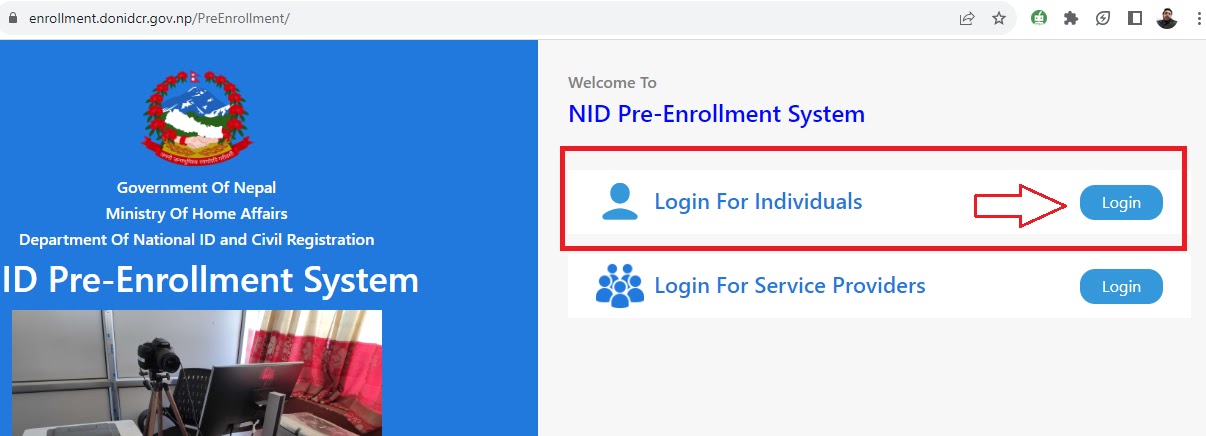
Step 1: Visit DONIDCR website using link above.
There will be a link called pre enrollment form fillup as shown in the image.
Step 2: Click on login fr individuals in the DONIDCR site
Step 3: Enter your phone number and enter the OTP from DONIDCR
Click on new entry as shown in photo below
Step 4: Fill the required personal information correctly
Click next after filing up each section.
After finishing the form fill up step by step as shown in above photo scroll down to the last page and click the submit button.
अनलाईन आवेदन भर्न पूर्व ध्यान दिनु पर्ने कुराहरु
- नेपालीमा भर्नु पर्ने फिल्डमा नेपालीमा र English मा भर्नु पर्ने फिल्डमा English मा Type हुने गरी Configure गरिएको छ।
- नेपालीमा भर्नु पर्ने फिल्डमा Nepali Unicode Romanized को Layout अनुसार टाईप गर्नु पर्नेछ। Nepali Unicode Romanized मा कसरी टाईप गर्ने हेर्नको लागि यँहा Click गर्नुहोस्।
- बिक्रम संबत (BS) बाट ईस्वी संवतमा (AD) Date Conversion स्वतः हुन्छ।
- “*” चिन्ह अंकित Field हरु अनिवार्य भर्नु पर्ने (Mandatory) Fields हुन।
- Mandatory Fields भरिसके पश्चात Save Draft गरेपछि १३ digit को आवेदन नम्बर प्राप्त हुन्छ।
- Appointment लिदाँ आफुलाई पायक पर्ने स्थान Dropdown मा देखिए सो स्थान छनौट गर्नुहोस र आफुलाई उपयुक्त मिति र समयको Appointment लिनुहोस् अन्यथा “Others/अन्य” छनौट गरी मिति र समयको लागि नजिकको जिल्ला प्रशासन कार्यालय वा ईलाका प्रशासन कार्यालयमा सम्पर्क गर्नुहोला।
Step 5: Click on submit and choose the place you want to provide your biometrics
- Photo
- Signature
- Fingerprint
Original citizenship card should be brought by the person and himsself should be present to provide the Biometric information.
Important notice regarding NID pre enrollment form fillup
You do not have to know hoow to type Nepali in NID preenrollment form. The system helps automatically. Read following notice for details.
NID pre enrollment contact number
To contact NID pre enrollment office contact following office
Important notice regarding Contact number nid pre enrollment
Here is given the special number dedicated for NID pre enrollment .
Please contact if you have any issues.
NID Card Download method
- Go to this link : https://citizenportal.donidcr.gov.np/en/check-nid-card-status
- Give al required information.
- Your details will be shown there.
NID Card print method
- go to website: https://citizenportal.donidcr.gov.np/en/check-national-id-number
- Provide the required info.
- Input captcha.
- See national ID.
Thank you if you have any query please contact us.
How to check SEE result here.